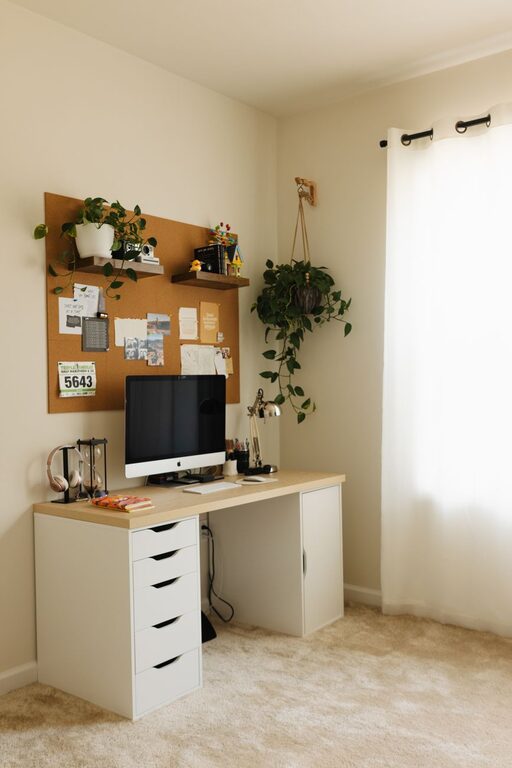
Creating and maintaining a clutter-free workspace, whether at home or in the office, plays a crucial role in enhancing productivity and reducing stress. A clean and organized environment allows you to focus better and complete tasks more efficiently. If you find yourself surrounded by piles of papers, tangled cords, or scattered supplies, it’s time to adopt some effective strategies to bring order to your workspace. Below, you’ll find practical tips to help you create a neat and inspiring work environment.
Why a Clutter-Free Workspace Matters
Before diving into the tips, it’s important to understand why an organized workspace is beneficial:
– Improves concentration: A tidy space minimizes distractions, helping you stay focused on your work.
– Saves time: When everything is in its place, you spend less time searching for items.
– Reduces stress: Clutter can cause a feeling of overwhelm; organizing your space creates calm and clarity.
– Boosts creativity: An orderly environment encourages clearer thinking and fresh ideas.
Assess Your Current Workspace
Start with an honest assessment of your current setup. Identify areas where clutter accumulates or where organization is lacking. Pay attention to:
– Desktop or tabletop surfaces
– Drawers and shelves
– Cable management
– Personal items and decorations
Understanding trouble spots will help you prioritize and apply the right solutions.
Tips for Organizing Your Workspace
1. Declutter Regularly
Schedule regular decluttering sessions. Whether once a week or once a month, remove unnecessary papers, expired items, and things you no longer use. Create three piles: keep, recycle, and discard. This habit prevents clutter from building up.
2. Use Storage Solutions
Invest in storage organizers like desk drawers, shelves, filing cabinets, or storage boxes. Categorizing and storing similar items together makes them easier to find. Here are some ideas:
– File folders: Organize important documents, bills, and notes by category.
– Pen holders and trays: Keep stationery neatly arranged and within reach.
– Cable organizers: Use clips or sleeves to prevent cords from tangling.
– Drawer dividers: Separate smaller items like paperclips or sticky notes.
3. Create Zones for Tasks
Divide your workspace into specific zones based on the type of work:
– Work zone: Your main computer or writing area.
– Supply zone: Stationery and office supplies.
– Reference zone: Books, manuals, or frequently used documents.
– Personal zone: Photos or personal items that make the space inviting but not distracting.
Organizing items by their purpose helps maintain order while maximizing efficiency.
4. Limit Personal Items and Decorations
While personal touches make a workspace pleasant, too many can add to clutter. Choose a few meaningful items like a photo frame, a small plant, or artwork, and avoid overloading your desk. This keeps the space welcoming but not crowded.
5. Digitize Where Possible
Reduce the amount of paper by digitizing documents and notes. Use scanning apps or software to store files electronically, allowing you to file and search easily without physical clutter. Back up important files regularly.
6. Maintain a Clean Desk Policy
At the end of each day, spend a few minutes tidying your desk—put everything back in its place, clear surfaces, and wipe down dust or spills. Starting the next day with a clean slate supports ongoing organization.
7. Use Labels and Clear Containers
Label storage boxes, drawers, and folders to identify contents quickly. Clear containers also help you see what’s inside at a glance, reducing time spent searching for items.
8. Optimize Lighting and Ergonomics
A well-lit and comfortable workspace encourages upkeep of the area. Good lighting reduces eye strain, and ergonomic furniture makes it easier to maintain a neat setup without discomfort.
Sample Workspace Setup Checklist
To help you implement these tips, here’s a checklist you can follow:
– [ ] Assess and declutter your workspace
– [ ] Sort items into keep, recycle, discard piles
– [ ] Purchase or arrange storage organizers suited to your needs
– [ ] Designate task-specific zones
– [ ] Limit personal items to a few favorites
– [ ] Begin digitizing paper documents
– [ ] Implement daily cleanup routine
– [ ] Label storage and use clear containers
– [ ] Check lighting and ergonomic setup
Conclusion
Organizing a clutter-free workspace doesn’t happen overnight, but by adopting these strategies, you can create a functional and calm environment that supports your work goals. Remember to maintain your organization system through regular tidying and review. With a consistently neat space, you’ll enjoy improved focus, efficiency, and a greater sense of satisfaction during your workday.
Start today by tackling one small area, and soon your workspace will feel like an inspiring, productive place to be.
About the Author