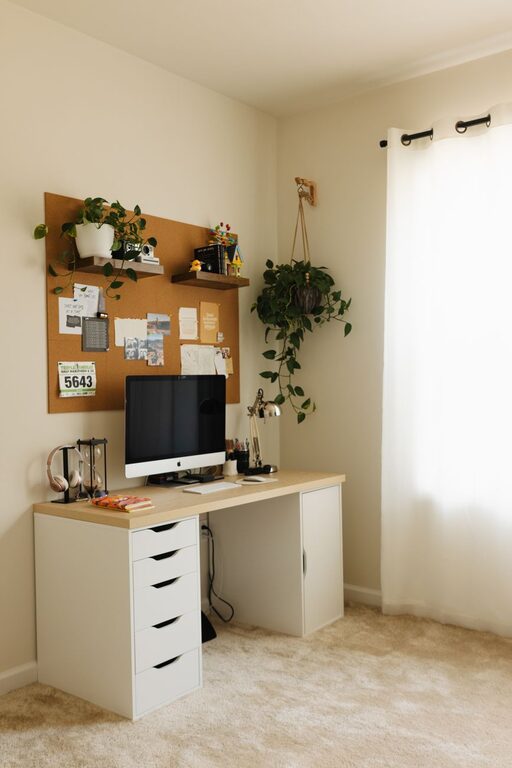
Creating a cozy and inviting home workspace is essential for maintaining focus, creativity, and comfort throughout your workday. Many people now spend a significant amount of time working from home, making it important to design a space that feels both functional and welcoming. Whether you have a dedicated room or just a small corner, these tips will help you transform your area into a productive and relaxing environment.
1. Choose the Right Location
One of the first steps to creating a comfortable workspace is selecting the best spot in your home. Ideally, this should be a quiet area with minimal distractions. If possible, choose a place with plenty of natural light, as it can improve mood and energy.
Consider These Factors When Choosing Your Spot:
– Distance from noisy household areas like the kitchen or living room
– Access to electrical outlets for your devices
– Good ventilation and fresh air circulation
– Room for storage and necessary furniture
If you don’t have a separate room, try to carve out a dedicated nook where work items are organized and separate from everyday clutter.
2. Invest in Comfortable Furniture
Comfort is key to staying productive without strain. A supportive chair and a suitable desk can prevent back and neck pain during long work sessions.
Tips for Choosing Furniture:
– Select an ergonomic chair with good lumbar support
– Ensure your desk height allows your elbows to rest at about a 90-degree angle
– Consider a desk with adjustable height for standing options
– Add a footrest for extra comfort if needed
You don’t need to buy expensive furniture. Sometimes, simply adding soft cushions or using a small stool can improve comfort.
3. Maximize Lighting
Proper lighting is crucial for reducing eye strain and creating a welcoming atmosphere. Natural light is best, so position your workspace near a window if possible.
Lighting Tips:
– Use layered lighting: combine natural light, overhead lamps, and desk lamps
– Choose bulbs with neutral or warm tones to create a cozy feel
– Avoid harsh fluorescent lights that can be fatiguing
– Consider a task lamp with adjustable brightness for focused work
Window treatments like sheer curtains can control glare while still letting light through.
4. Organize Your Space
A clutter-free area helps clear your mind and keeps you focused. Creating an organizational system that works for you can make a big difference.
Organizational Ideas:
– Use storage bins or trays for small items
– Invest in shelves or filing cabinets for papers and books
– Keep frequently used items within easy reach
– Declutter regularly to prevent buildup
Labeling boxes or folders can save time when searching for documents or tools.
5. Personalize Your Workspace
Adding personal touches makes your workspace feel inviting and boosts your mood. It’s important to create a space where you enjoy spending time.
Ways to Personalize:
– Hang artwork or photos that inspire you
– Add plants or flowers to bring in natural elements
– Use decorative cushions or rugs for softness and color
– Display meaningful objects or motivational quotes
Remember to keep decorations balanced to maintain a professional and distraction-free environment.
6. Incorporate Soothing Elements
Creating a calm environment can reduce stress and improve concentration. Consider adding subtle touches that promote relaxation.
Ideas for Soothing Elements:
– Soft background music or white noise machines
– Aromatherapy with essential oils or scented candles (if safe)
– Comfortable textiles like blankets or cushions
– A small water fountain or natural sounds apps
These elements help create a peaceful workspace without overwhelming you.
7. Manage Technology Wisely
Technology is essential for many home workspaces but can also add clutter and distractions. Organize your devices and manage digital tools thoughtfully.
Tips for Technology:
– Use cable organizers to keep cords untangled
– Set up your monitor at eye level to avoid neck strain
– Keep chargers and peripherals nearby but tidy
– Use apps that block distracting websites during work hours
Investing in a quality headset or speaker can improve communication if you frequently participate in meetings.
8. Establish Boundaries
Creating a cozy workspace also means setting physical and mental boundaries between work and personal life. It helps maintain balance and prevents burnout.
How to Establish Boundaries:
– Keep your work area separate from relaxation zones if possible
– Pack away work materials at the end of the day
– Use visual cues like closing the door or arranging a screen
– Communicate your work hours clearly to household members
Making these boundaries clear will help your home feel more balanced.
—
By following these tips, you can design a home workspace that supports your productivity while also feeling warm and inviting. Remember, the goal is to create a space that fits your personal needs and preferences, helping you stay focused and comfortable every day. Take time to experiment with different arrangements and décor until you find the perfect balance for your work-from-home lifestyle.
About the Author